<?xml version="1.0" encoding="utf-8"?><feed xmlns="http://www.w3.org/2005/Atom" ><generator uri="https://jekyllrb.com/" version="4.3.2">Jekyll</generator><link href="https://adhikary.net/feed.xml" rel="self" type="application/atom+xml" /><link href="https://adhikary.net/" rel="alternate" type="text/html" /><updated>2025-02-16T15:37:43+00:00</updated><id>https://adhikary.net/feed.xml</id><title type="html">Aniruddha Adhikary (Ani)</title><subtitle>A Public Servant and Polyglot Software Engineer hacking away from the sunny shores of Singapore.</subtitle><entry><title type="html">Applying for a Bangladesh Tourist Visa 🇧🇩 in Singapore</title><link href="https://adhikary.net/2022/07/13/applying-for-a-bangladesh-tourist-visa-in-singapore" rel="alternate" type="text/html" title="Applying for a Bangladesh Tourist Visa 🇧🇩 in Singapore" /><published>2022-07-13T05:18:47+00:00</published><updated>2022-07-13T05:18:47+00:00</updated><id>https://adhikary.net/2022/07/13/applying-for-a-bangladesh-tourist-visa-in-singapore</id><content type="html" xml:base="https://adhikary.net/2022/07/13/applying-for-a-bangladesh-tourist-visa-in-singapore"><![CDATA[<p><!-- wp:paragraph --></p>
<p>For a Bangladesh Tourist Visa, you need to fill up a Visa Application Form and have a copy of your ID photo, your air tickets (with return flight), and documents to support your purpose of travel. S$29 would be charged for a Single-visit visa.</p>
<p><!-- /wp:paragraph --></p>
<p><!-- wp:more --><br />
<!--more--><br />
<!-- /wp:more --></p>
<p><!-- wp:heading --></p>
<h2>Visa on Arrival</h2>
<p><!-- /wp:heading --></p>
<p><!-- wp:paragraph --></p>
<p>Please check with <a href="https://www.iatatravelcentre.com/" target="_blank" rel="noreferrer noopener">IATA Travel Center</a> for up-to-date information on this.</p>
<p><!-- /wp:paragraph --></p>
<p><!-- wp:paragraph --></p>
<p>Citizens of the USA, Canada, Australia, New Zealand, Russian Federation, China, Japan, <strong>Singapore</strong>, Malaysia, South Korea, UAE, Saudi Arabia (KSA). Qatar. Kuwait, Oman, Bahrain, and the countries of Europe can obtain a <strong>Visa on Arrival</strong> for Business/Tourism.</p>
<p><!-- /wp:paragraph --></p>
<p><!-- wp:paragraph --></p>
<p>Although Singaporeans are eligible for the Visa on Arrival facility, we decided to apply for a Bangladesh Tourist Visa anyway for <strong>peace of mind</strong>.</p>
<p><!-- /wp:paragraph --></p>
<p><!-- wp:quote --></p>
<blockquote class="wp-block-quote"><p>Special Note: Citizens of the Philippines, Vietnam, Laos, Indonesia, etc do not have Visa on Arrival facilities. Citizens of countries not mentioned in the VoA list must apply for a Bangladesh Tourist Visa beforehand.</p>
</blockquote>
<p><!-- /wp:quote --></p>
<p><!-- wp:heading --></p>
<h2>Whole Visa Application Process</h2>
<p><!-- /wp:heading --></p>
<p><!-- wp:list {"ordered":true} --></p>
<ol>
<li>Gather Documents, make hotel bookings and get air tickets.</li>
<li>Submit Visa Application at Embassy.</li>
<li>Collect your visa in 3-4 working days.</li>
</ol>
<p><!-- /wp:list --></p>
<p><!-- wp:heading --></p>
<h2>Necessary Visa Documents</h2>
<p><!-- /wp:heading --></p>
<p><!-- wp:list {"ordered":true} --></p>
<ol>
<li>A filled-up <a href="https://www.visa.gov.bd/">Visa Application Form</a>. Please submit the visa application form online. Take a printout.</li>
<li>1 copy of 35 mm x 45 mm color photograph of the applicant.</li>
<li>Air Tickets (with return flight).</li>
<li>Singapore NRIC / Employment Pass / S-Pass / Work Permit.</li>
<li>A copy of the Passport ID page, and last visa page.</li>
<li>Your actual passport.</li>
<li>A <em>hotel booking</em> <strong>or</strong> <em>letter of invitation</em> <strong>or</strong> <em>letter of sponsorship</em>.</li>
</ol>
<p><!-- /wp:list --></p>
<p><!-- wp:image {"id":837,"sizeSlug":"large","linkDestination":"none"} --></p>
<figure class="wp-block-image size-large"><img src="https://adhikary.net/wp-content/uploads/2022/07/Screenshot-2022-07-13-at-12.51.43-PM-1024x427.png" alt="" class="wp-image-837"/><br />
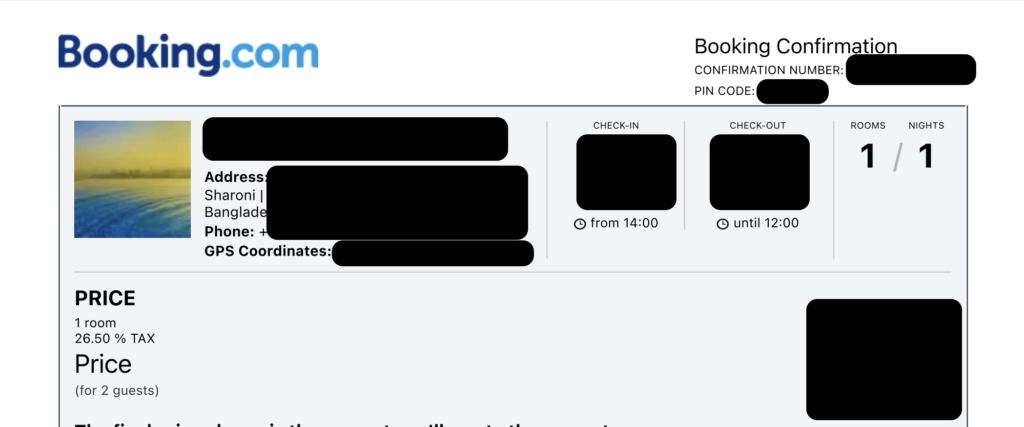
<figcaption>Hotel Booking Confirmation</figcaption>
</figure>
<p><!-- /wp:image --></p>
<p><!-- wp:paragraph --></p>
<p>If you're visiting the country and staying in a hotel, definitely make a <a href="https://booking.com" target="_blank" rel="noreferrer noopener">booking online</a>. You'll need a printed confirmation letter.</p>
<p><!-- /wp:paragraph --></p>
<p><!-- wp:image {"id":838,"sizeSlug":"large","linkDestination":"none"} --></p>
<figure class="wp-block-image size-large"><img src="https://adhikary.net/wp-content/uploads/2022/07/Screenshot-2022-07-13-at-12.55.05-PM-1024x497.png" alt="" class="wp-image-838"/><br />
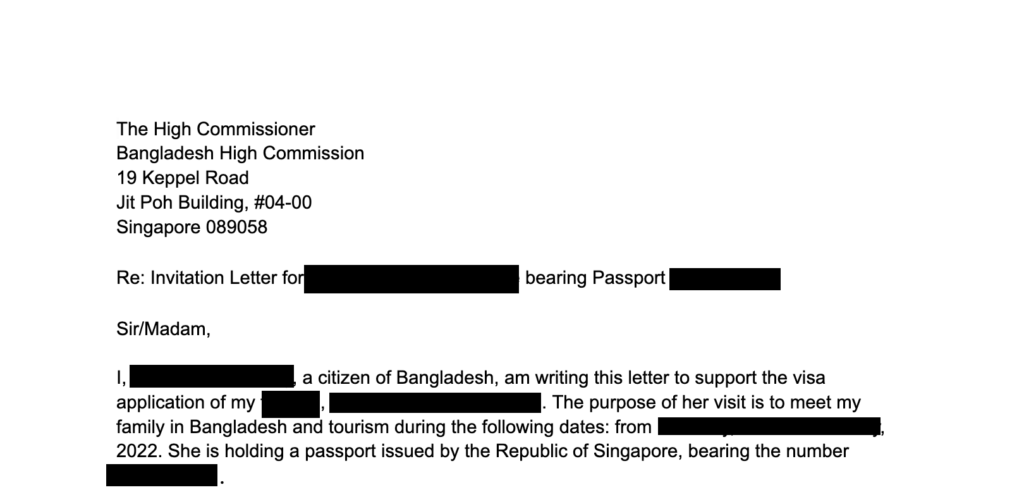
<figcaption>Visa Invitation Letter</figcaption>
</figure>
<p><!-- /wp:image --></p>
<p><!-- wp:paragraph --></p>
<p>If you're staying at a (Bangladeshi Citizen) friend's home, get a signed letter of invitation from the friend. The letter of invitation should include,</p>
<p><!-- /wp:paragraph --></p>
<p><!-- wp:list --></p>
<ul>
<li>Your relationship with the sponsor</li>
<li>The local address of your stay</li>
<li>The local contact number of the sponsor</li>
<li>Reason for your visit (i.e., meeting family, tourism)</li>
<li>Means of funding for the trip (i.e, credit card, cash, sponsorship)</li>
<li>The Passport numbers of the sponsor and the visitor</li>
<li>NID Card Number of the sponsor</li>
<li>If possible, include a copy of the Bangladesh NID card of the sponsor.</li>
</ul>
<p><!-- /wp:list --></p>
<p><!-- wp:paragraph --></p>
<p>I have prepared a Bangladesh Tourist Visa Invitation letter template for your convenience. You may download it by clicking the button below.</p>
<p><!-- /wp:paragraph --></p>
<p><!-- wp:buttons --></p>
<div class="wp-block-buttons"><!-- wp:button --></p>
<div class="wp-block-button"><a class="wp-block-button__link" href="https://docs.google.com/document/d/13AKi_Nz7ZqxU3RvKagSbTNbQsuVpNmXLxi-zCjdiPcc/edit?usp=sharing" target="_blank" rel="noreferrer noopener">Download Bangladesh Tourist Visa Letter Template</a></div>
<p><!-- /wp:button --></div>
<p><!-- /wp:buttons --></p>
<p><!-- wp:heading --></p>
<h2>Filling up the Visa Application Form</h2>
<p><!-- /wp:heading --></p>
<p><!-- wp:image {"id":836,"sizeSlug":"large","linkDestination":"none"} --></p>
<figure class="wp-block-image size-large"><img src="https://adhikary.net/wp-content/uploads/2022/07/Screenshot-2022-07-13-at-12.47.53-PM-1024x501.png" alt="" class="wp-image-836"/><br />
<figcaption>Bangladesh Visa Application Website</figcaption>
</figure>
<p><!-- /wp:image --></p>
<p><!-- wp:list {"ordered":true} --></p>
<ol>
<li>Visit <a href="http://visa.gov.bd" target="_blank" rel="noreferrer noopener">visa.gov.bd</a>.</li>
<li>Fill up your personal information and travel information.</li>
<li>On the payment step, leave the payment details empty as you'll pay at the High Commission.</li>
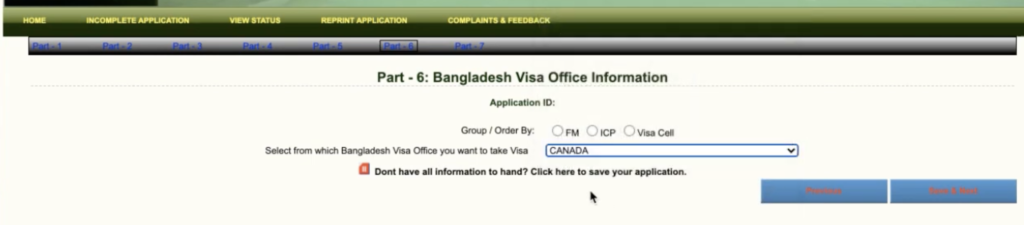
<li>In "Part 6 - Bangladesh Visa Office Information", choose <strong>Singapore</strong>. Leave the "Group / Order by" empty.</li>
<li>Review your information and submit it.</li>
<li>Take a printout.</li>
<li>Sign the application form on page 3.</li>
</ol>
<p><!-- /wp:list --></p>
<p><!-- wp:image {"id":839,"sizeSlug":"large","linkDestination":"none"} --></p>
<figure class="wp-block-image size-large"><img src="https://adhikary.net/wp-content/uploads/2022/07/Screenshot-2022-07-13-at-1.15.06-PM-1024x225.png" alt="" class="wp-image-839"/><br />
<figcaption>Bangladesh Visa Office information</figcaption>
</figure>
<p><!-- /wp:image --></p>
<p><!-- wp:paragraph --></p>
<p>The High Commission of Bangladesh in Canada created a video tutorial, you can follow this video as a guide. Remember to select <strong>Singapore</strong> instead of Canada during the application!</p>
<p><!-- /wp:paragraph --></p>
<p><!-- wp:embed {"url":"https://www.youtube.com/watch?v=R7Ulv1-x5OU","type":"video","providerNameSlug":"youtube","responsive":true,"className":"wp-embed-aspect-16-9 wp-has-aspect-ratio"} --></p>
<figure class="wp-block-embed is-type-video is-provider-youtube wp-block-embed-youtube wp-embed-aspect-16-9 wp-has-aspect-ratio">
<div class="wp-block-embed__wrapper">
https://www.youtube.com/watch?v=R7Ulv1-x5OU
</div>
<figcaption>How to Apply for a Bangladesh Entry Visa</figcaption>
</figure>
<p><!-- /wp:embed --></p>
<p><!-- wp:heading --></p>
<h2>Submitting the Visa Application</h2>
<p><!-- /wp:heading --></p>
<p><!-- wp:paragraph --></p>
<p>Once you have everything printed and copied, put them in a folder. Make sure you have S$29 ready on your bank card. The High Commission of Bangladesh only accepts NETS payments. Cash is not accepted.</p>
<p><!-- /wp:paragraph --></p>
<p><!-- wp:paragraph --></p>
<p>The High Commission is open on weekdays 9:30 AM - 12:30 PM for visa applications.</p>
<p><!-- /wp:paragraph --></p>
<p><!-- wp:jetpack/map {"points":[{"placeTitle":"Jit Poh Building","title":"Jit Poh Building","caption":"Jit Poh Building, 19 Keppel Rd, Singapore, Central 089058, Singapore","id":"poi.163208764420","coordinates":{"longitude":103.842321,"latitude":1.272794}}],"mapCenter":{"lng":103.842321,"lat":1.272794}} --></p>
<div class="wp-block-jetpack-map" data-map-style="default" data-map-details="true" data-points="[{"placeTitle":"Jit Poh Building","title":"Jit Poh Building","caption":"Jit Poh Building, 19 Keppel Rd, Singapore, Central 089058, Singapore","id":"poi.163208764420","coordinates":{"longitude":103.842321,"latitude":1.272794}}]" data-zoom="13" data-map-center="{"lng":103.842321,"lat":1.272794}" data-marker-color="red" data-show-fullscreen-button="true">
<ul>
<li><a href="https://www.google.com/maps/search/?api=1&amp;query=1.272794,103.842321">Jit Poh Building</a></li>
</ul>
</div>
<p><!-- /wp:jetpack/map --></p>
<p><!-- wp:paragraph --></p>
<p>Head down to <a href="https://goo.gl/maps/aNAWkGv6jeAtBiap6" target="_blank" rel="noreferrer noopener">Jit Poh Building</a>. Head to #04-00. Take a queue number from the machine.</p>
<p><!-- /wp:paragraph --></p>
<p><!-- wp:paragraph --></p>
<p>Once it is your turn, submit your documents. They will provide you with a receipt after payment. You need to keep that receipt for passport collection. It will take 3-4 working days before the visa is ready. On the date specified on the receipt, visit the High Commission to collect your passport.</p>
<p><!-- /wp:paragraph --></p>
<p><!-- wp:heading {"level":3} --></p>
<h3>Checking Status</h3>
<p><!-- /wp:heading --></p>
<p><!-- wp:list {"ordered":true} --></p>
<ol>
<li>Please head over to <a href="https://www.visa.gov.bd/ViewStatus.aspx">https://www.visa.gov.bd/ViewStatus.aspx</a>.</li>
<li>Enter your Username and Password from the online application.</li>
</ol>
<p><!-- /wp:list --></p>
<p><!-- wp:paragraph --></p>
<p>Now, if it says <strong>Approved</strong>, well, it is approved. Congratulations!</p>
<p><!-- /wp:paragraph --></p>
<p><!-- wp:paragraph --></p>
<p>However, <strong>Rejected</strong> doesn't mean Rejected. If the application is still being processed, sometimes it is shown as Rejected. Just visit the embassy on the day noted on your receipt.</p>
<p><!-- /wp:paragraph --></p>
<p><!-- wp:paragraph --></p>
<p>Please feel free to comment if you have any questions.</p>
<p><!-- /wp:paragraph --></p>]]></content><author><name>Aniruddha Adhikary</name></author><category term="Uncategorized" /><summary type="html"><![CDATA[For a Bangladesh Tourist Visa, you need to fill up a Visa Application Form and have a copy of your ID photo, your air tickets (with return flight), and documents to support your purpose of travel. S$29 would be charged for a Single-visit visa. Visa on Arrival Please check with IATA Travel Center for up-to-date information on this. Citizens of the USA, Canada, Australia, New Zealand, Russian Federation, China, Japan, Singapore, Malaysia, South Korea, UAE, Saudi Arabia (KSA). Qatar. Kuwait, Oman, Bahrain, and the countries of Europe can obtain a Visa on Arrival for Business/Tourism. Although Singaporeans are eligible for the Visa on Arrival facility, we decided to apply for a Bangladesh Tourist Visa anyway for peace of mind. Special Note: Citizens of the Philippines, Vietnam, Laos, Indonesia, etc do not have Visa on Arrival facilities. Citizens of countries not mentioned in the VoA list must apply for a Bangladesh Tourist Visa beforehand. Whole Visa Application Process Gather Documents, make hotel bookings and get air tickets. Submit Visa Application at Embassy. Collect your visa in 3-4 working days. Necessary Visa Documents A filled-up Visa Application Form. Please submit the visa application form online. Take a printout. 1 copy of 35 mm x 45 mm color photograph of the applicant. Air Tickets (with return flight). Singapore NRIC / Employment Pass / S-Pass / Work Permit. A copy of the Passport ID page, and last visa page. Your actual passport. A hotel booking or letter of invitation or letter of sponsorship. Hotel Booking Confirmation If you're visiting the country and staying in a hotel, definitely make a booking online. You'll need a printed confirmation letter. Visa Invitation Letter If you're staying at a (Bangladeshi Citizen) friend's home, get a signed letter of invitation from the friend. The letter of invitation should include, Your relationship with the sponsor The local address of your stay The local contact number of the sponsor Reason for your visit (i.e., meeting family, tourism) Means of funding for the trip (i.e, credit card, cash, sponsorship) The Passport numbers of the sponsor and the visitor NID Card Number of the sponsor If possible, include a copy of the Bangladesh NID card of the sponsor. I have prepared a Bangladesh Tourist Visa Invitation letter template for your convenience. You may download it by clicking the button below. Download Bangladesh Tourist Visa Letter Template Filling up the Visa Application Form Bangladesh Visa Application Website Visit visa.gov.bd. Fill up your personal information and travel information. On the payment step, leave the payment details empty as you'll pay at the High Commission. In "Part 6 - Bangladesh Visa Office Information", choose Singapore. Leave the "Group / Order by" empty. Review your information and submit it. Take a printout. Sign the application form on page 3. Bangladesh Visa Office information The High Commission of Bangladesh in Canada created a video tutorial, you can follow this video as a guide. Remember to select Singapore instead of Canada during the application! https://www.youtube.com/watch?v=R7Ulv1-x5OU How to Apply for a Bangladesh Entry Visa Submitting the Visa Application Once you have everything printed and copied, put them in a folder. Make sure you have S$29 ready on your bank card. The High Commission of Bangladesh only accepts NETS payments. Cash is not accepted. The High Commission is open on weekdays 9:30 AM - 12:30 PM for visa applications. Jit Poh Building Head down to Jit Poh Building. Head to #04-00. Take a queue number from the machine. Once it is your turn, submit your documents. They will provide you with a receipt after payment. You need to keep that receipt for passport collection. It will take 3-4 working days before the visa is ready. On the date specified on the receipt, visit the High Commission to collect your passport. Checking Status Please head over to https://www.visa.gov.bd/ViewStatus.aspx. Enter your Username and Password from the online application. Now, if it says Approved, well, it is approved. Congratulations! However, Rejected doesn't mean Rejected. If the application is still being processed, sometimes it is shown as Rejected. Just visit the embassy on the day noted on your receipt. Please feel free to comment if you have any questions.]]></summary></entry><entry><title type="html">Hasura JWKS: JWT w/ Multiple Auth0 tenants</title><link href="https://adhikary.net/2021/09/27/hasura-jwks-jwt-w-multiple-auth0-tenants" rel="alternate" type="text/html" title="Hasura JWKS: JWT w/ Multiple Auth0 tenants" /><published>2021-09-26T16:53:54+00:00</published><updated>2021-09-26T16:53:54+00:00</updated><id>https://adhikary.net/2021/09/27/hasura-jwks-jwt-w-multiple-auth0-tenants</id><content type="html" xml:base="https://adhikary.net/2021/09/27/hasura-jwks-jwt-w-multiple-auth0-tenants"><![CDATA[<p><!-- wp:paragraph --></p>
<p>TL;DR - By default, Hasura does not accept multiple JWKS URLs. Thus, write a lambda or a simple HTTP API to combine the JWKS keys of multiple tenants into a single JWKS endpoint. (Bonus: Buggy Auth0 fingerprint implementation)</p>
<p><!-- /wp:paragraph --></p>
<p><!-- wp:more --><br />
<!--more--><br />
<!-- /wp:more --></p>
<p><!-- wp:heading {"level":3} --></p>
<h3>Prelude</h3>
<p><!-- /wp:heading --></p>
<p><!-- wp:paragraph --></p>
<p>Before starting, please make sure to add the Auth0 Rule as mentioned <a href="https://hasura.io/docs/latest/graphql/core/guides/integrations/auth0-jwt.html" target="_blank" rel="noreferrer noopener">in this support document</a>. Test to make sure the Hasura Claim is present in the JWT issued by Auth0. </p>
<p><!-- /wp:paragraph --></p>
<p><!-- wp:heading {"level":3} --></p>
<h3>The Auth0 JWKS Bug</h3>
<p><!-- /wp:heading --></p>
<p><!-- wp:paragraph --></p>
<p>Thanks to a <a href="https://community.auth0.com/t/certificate-thumbprint-is-longer-than-20-bytes/7794/3">pretty weird bug</a> in Auth0, if you have an old signing key generated on/before April 2020, the key has an invalid x5t fingerprint. Thus, Hasura will not work if you point it to a JWKS endpoint containing the old x5t fingerprints.</p>
<p><!-- /wp:paragraph --></p>
<p><!-- wp:paragraph --></p>
<p>Thankfully, Auth0 has issued a fix, and all you need to do is <a href="https://community.auth0.com/t/jwk-certificate-thumbprint-is-invalid/16070/22" target="_blank" rel="noreferrer noopener">rotate your signing keys</a>.</p>
<p><!-- /wp:paragraph --></p>
<p><!-- wp:heading {"level":3} --></p>
<h3>Observing the JWKS response</h3>
<p><!-- /wp:heading --></p>
<p><!-- wp:paragraph --></p>
<p>The JWKS URL of your Auth0 Tenant will respond resembling the type declaration stated below.</p>
<p><!-- /wp:paragraph --></p>
<p><!-- wp:paragraph --></p>
<p>(Hint: <em><code>https://<your-domain>.<your-data-center>.auth0.com/.well-known/jwks.json</code></em> )</p>
<p><!-- /wp:paragraph --></p>
<p><!-- wp:code --></p>
<pre class="wp-block-code"><code>export interface Key {
    alg: string;
    kty: string;
    use: string;
    n: string;
    e: string;
    kid: string;
    x5t: string;
    x5c: string&#91;];
}

export interface RootObject {
    keys: Key&#91;];
}</code></pre>
<p><!-- /wp:code --></p>
<p><!-- wp:paragraph --></p>
<p>Thus, we just need to fetch the JWKS Key objects from all our tenants and merge them into a single keys array. Let's do it.</p>
<p><!-- /wp:paragraph --></p>
<p><!-- wp:heading {"level":3} --></p>
<h3>Building the Lambda</h3>
<p><!-- /wp:heading --></p>
<p><!-- wp:paragraph --></p>
<p>Let's list down all our JWKS endpoints in an array. Make sure to replace it with your Auth0 Domains.</p>
<p><!-- /wp:paragraph --></p>
<p><!-- wp:code --></p>
<pre class="wp-block-code"><code>const jwksUrls = &#91;
    'https://foo.au.auth0.com/.well-known/jwks.json',
    'https://bar.au.auth0.com/.well-known/jwks.json',
    'https://baz.au.auth0.com/.well-known/jwks.json',
];</code></pre>
<p><!-- /wp:code --></p>
<p><!-- wp:paragraph --></p>
<p>Next, time to parallelly download all the JWKs for merging. We'll be using <code>axios</code>.</p>
<p><!-- /wp:paragraph --></p>
<p><!-- wp:code --></p>
<pre class="wp-block-code"><code>const axios = require("axios");

const responses = await Promise.all(jwksUrls.map((url) => axios.get(url)));
const keySets = responses.map(response => response.data.keys)</code></pre>
<p><!-- /wp:code --></p>
<p><!-- wp:paragraph --></p>
<p>Okay, we have to take a break here. Recall the Auth0 x5t bug? Yeah. It turns out, even if you rotate the key, for the sake of other microservices in your system, you may decide to keep the previous key still valid. Otherwise, the previously issued tokens would become invalid and your users wouldn't stay "logged in" anymore.</p>
<p><!-- /wp:paragraph --></p>
<p><!-- wp:paragraph --></p>
<p>There is a tiny workaround. It is to remove the invalid keys with the invalid x5t signatures from the <code>keySets</code>. However, this does mean that your new Hasura system will only work with newly issued JWT tokens signed with your shiny new key. Thus, we will replace that last line with,</p>
<p><!-- /wp:paragraph --></p>
<p><!-- wp:code --></p>
<pre class="wp-block-code"><code>const keySets = responses.map(response => response.data.keys.filter(key => key.kid !== key.x5t));</code></pre>
<p><!-- /wp:code --></p>
<p><!-- wp:paragraph --></p>
<p>Because in the faulty implementation, the kid and x5t are the same.</p>
<p><!-- /wp:paragraph --></p>
<p><!-- wp:heading {"level":3} --></p>
<h3>The final code for the Lambda</h3>
<p><!-- /wp:heading --></p>
<p><!-- wp:html --><br />
<script src="https://gist.github.com/aniruddha-adhikary/f5e2ecbdc527bcece8bebf9045e464f6.js"></script><br />
<!-- /wp:html --></p>
<p><!-- wp:heading {"level":3} --></p>
<h3>Pointing Hasura to the JWKs endpoint</h3>
<p><!-- /wp:heading --></p>
<p><!-- wp:paragraph --></p>
<p>You may choose to create a lambda or host this function any way depending on your preference. Finally, once you have the endpoint to the JWKS merging API, simply point Hasura to it. Update the <strong><code>HASURA_GRAPHQL_JWT_SECRET</code></strong> environment variable to,</p>
<p><!-- /wp:paragraph --></p>
<p><!-- wp:code --></p>
<pre class="wp-block-code"><code>{
  "type":"RS256",
  "jwk_url": "<YOUR_ENDPOINT_GOES_HERE>",
  "claims_format": "stringified_json"
}</code></pre>
<p><!-- /wp:code --></p>
<p><!-- wp:paragraph --></p>
<p>The end!</p>
<p><!-- /wp:paragraph --></p>]]></content><author><name>Aniruddha Adhikary</name></author><category term="Uncategorized" /><summary type="html"><![CDATA[TL;DR - By default, Hasura does not accept multiple JWKS URLs. Thus, write a lambda or a simple HTTP API to combine the JWKS keys of multiple tenants into a single JWKS endpoint. (Bonus: Buggy Auth0 fingerprint implementation) Prelude Before starting, please make sure to add the Auth0 Rule as mentioned in this support document. Test to make sure the Hasura Claim is present in the JWT issued by Auth0. The Auth0 JWKS Bug Thanks to a pretty weird bug in Auth0, if you have an old signing key generated on/before April 2020, the key has an invalid x5t fingerprint. Thus, Hasura will not work if you point it to a JWKS endpoint containing the old x5t fingerprints. Thankfully, Auth0 has issued a fix, and all you need to do is rotate your signing keys. Observing the JWKS response The JWKS URL of your Auth0 Tenant will respond resembling the type declaration stated below. (Hint: https://..auth0.com/.well-known/jwks.json ) export interface Key { alg: string; kty: string; use: string; n: string; e: string; kid: string; x5t: string; x5c: string&#91;]; }]]></summary></entry><entry><title type="html">I reverse-engineered TraceTogether, for the “right reasons”</title><link href="https://adhikary.net/2020/08/08/i-reverse-engineered-tracetogether-for-the-right-reasons" rel="alternate" type="text/html" title="I reverse-engineered TraceTogether, for the “right reasons”" /><published>2020-08-08T00:08:42+00:00</published><updated>2020-08-08T00:08:42+00:00</updated><id>https://adhikary.net/2020/08/08/i-reverse-engineered-tracetogether-for-the-right-reasons</id><content type="html" xml:base="https://adhikary.net/2020/08/08/i-reverse-engineered-tracetogether-for-the-right-reasons"><![CDATA[<p><!-- wp:paragraph --></p>
<p>When TraceTogether was rolled out in Singapore, I geeked out with the BlueTrace Protocol and the basics of how it worked. However, with my experience of volunteering for the migrant population, I knew that we needed translations, badly. We needed translations if we wanted to an effective deployment of TraceTogether in the vulnerable population.</p>
<p><!-- /wp:paragraph --></p>
<p><!-- wp:quote --></p>
<blockquote class="wp-block-quote"><p>With their little command over English, would most migrant of the migrant brothers be able to effectively use TraceTogether?</p>
</blockquote>
<p><!-- /wp:quote --></p>
<p><!-- wp:more --><br />
<!--more--><br />
<!-- /wp:more --></p>
<p><!-- wp:heading --></p>
<h2>Tracing the Contacts</h2>
<p><!-- /wp:heading --></p>
<p><!-- wp:paragraph --></p>
<p>I immediately texted everyone I knew, working with GovTech or SingHealth. I contacted GovTech on a few channels to connect me to the right person. I was surprised at the speed they responded with contacts! Finally, along with active help from Sudesna, a recent NUS-grad young physician, I got a few contacts to move forward.</p>
<p><!-- /wp:paragraph --></p>
<p><!-- wp:heading --></p>
<h2>Meanwhile</h2>
<p><!-- /wp:heading --></p>
<p><!-- wp:paragraph --></p>
<p>I was anxious to get the translations rolled out. <strong>I needed to start translating by the time I reached the correct person-in-charge.</strong> So, as any sane human would do, I started a Google Sheet, and tried to type in text from the app interface. Soon however, I realised this was unsustainable as some of the hidden screens would remain untranslated.</p>
<p><!-- /wp:paragraph --></p>
<p><!-- wp:paragraph --></p>
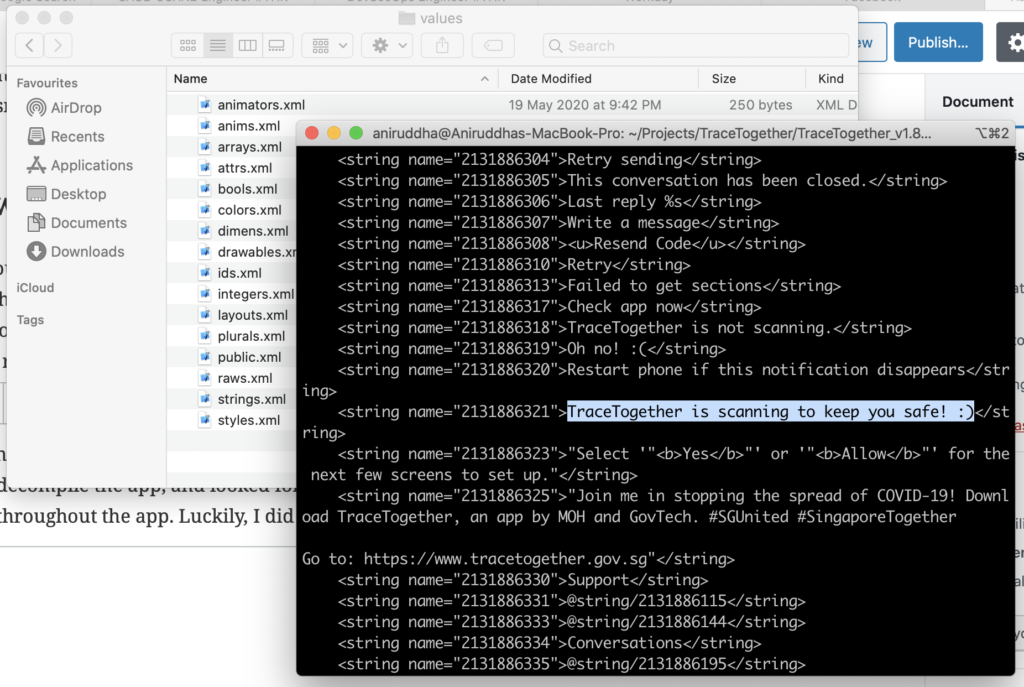
<p>So, I took the Android app, and started reverse-engineering. I used a tool named apktool to decompile the app, and looked for the file containing all the "strings of text" used throughout the app. Luckily, I did find the English resources file. </p>
<p><!-- /wp:paragraph --></p>
<p><!-- wp:image {"id":469,"sizeSlug":"large"} --></p>
<figure class="wp-block-image size-large"><img src="https://adhikary.net/wp-content/uploads/2020/08/Screenshot-2020-08-08-at-9.45.08-AM-1024x687.png" alt="" class="wp-image-469"/></figure>
<p><!-- /wp:image --></p>
<p><!-- wp:paragraph --></p>
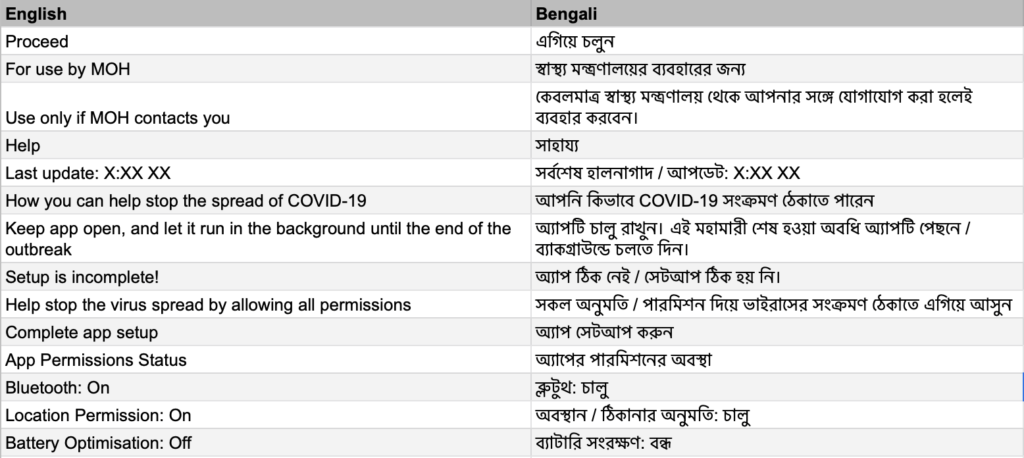
<p>However, it was XML, and I needed to spit out a CSV/Excel file for it to be any good. Developers always try to automate everything. Spirited, I did write a simple Python script to convert this document into a CSV, uploaded to Google Sheets and started translating.</p>
<p><!-- /wp:paragraph --></p>
<p><!-- wp:image {"id":470,"sizeSlug":"large"} --></p>
<figure class="wp-block-image size-large"><img src="https://adhikary.net/wp-content/uploads/2020/08/Screenshot-2020-08-08-at-9.47.31-AM-1024x458.png" alt="" class="wp-image-470"/></figure>
<p><!-- /wp:image --></p>
<p><!-- wp:paragraph --></p>
<p>I was happy. I felt relieved. Now, all I had to do was to hand this over to the responsible team to be implemented.</p>
<p><!-- /wp:paragraph --></p>
<p><!-- wp:heading --></p>
<h2>The Contact!</h2>
<p><!-- /wp:heading --></p>
<p><!-- wp:paragraph --></p>
<p>Finally I found a person from the Hive Team coordinating UI/UX efforts of TraceTogether. They were delighted to see the efforts, however had to let me know that, the (then) current version of the app wasn't designed to be multilingual, and a new version with new strings would be released soon!</p>
<p><!-- /wp:paragraph --></p>
<p><!-- wp:paragraph --></p>
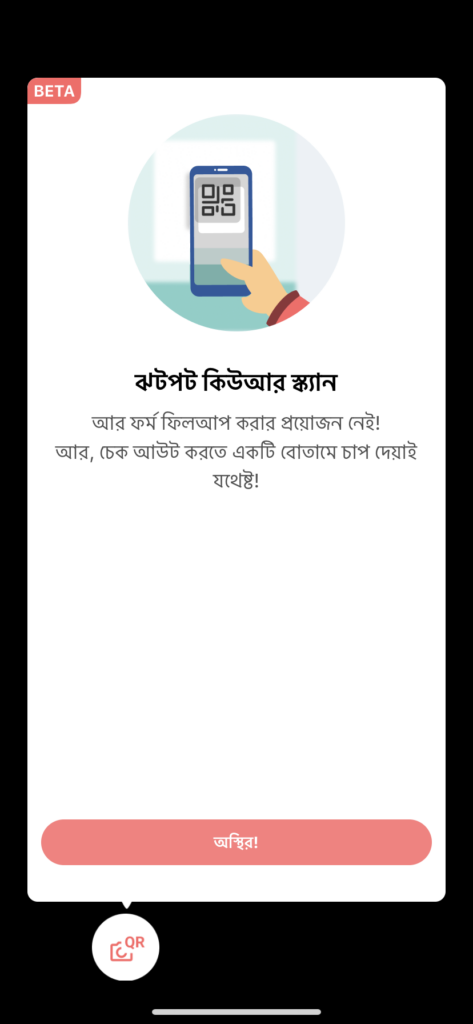
<p>Altho, not all of TraceTogether was translated by individual contributors from the members of the public. My translations were partially accepted to some of the untranslated parts of TraceTogether. <strong>The Team was very aware of the need of the migrant population, and started their own effort of translation even before me!</strong> However, as people with hearts, they always did try to encourage us volunteers, and made opportunities for us to contribute here and there.</p>
<p><!-- /wp:paragraph --></p>
<p><!-- wp:gallery {"ids":[475,476]} --></p>
<figure class="wp-block-gallery columns-2 is-cropped">
<ul class="blocks-gallery-grid">
<li class="blocks-gallery-item">
<figure><img src="https://adhikary.net/wp-content/uploads/2020/08/IMG_0340-473x1024.png" alt="" data-id="475" data-full-url="https://adhikary.net/wp-content/uploads/2020/08/IMG_0340.png" data-link="https://adhikary.net/?attachment_id=475" class="wp-image-475"/></figure>
</li>
<li class="blocks-gallery-item">
<figure><img src="https://adhikary.net/wp-content/uploads/2020/08/IMG_0341-473x1024.png" alt="" data-id="476" data-full-url="https://adhikary.net/wp-content/uploads/2020/08/IMG_0341.png" data-link="https://adhikary.net/?attachment_id=476" class="wp-image-476"/></figure>
</li>
</ul>
</figure>
<p><!-- /wp:gallery --></p>
<p><!-- wp:paragraph --></p>
<p>We started working to translate the newer features of the app. One of the first features I translated, was the SafeEntry check-in feature. I still get excited to see my translations on the app. </p>
<p><!-- /wp:paragraph --></p>
<p><!-- wp:paragraph --></p>
<p>I believe allowing the public to participate is empowering us, giving us a feeling of achievement as we could contribute as much as we could, in helping to keep this tiny island we call home, safe. Thanks, the HIVE TEAM!</p>
<p><!-- /wp:paragraph --></p>
<p><!-- wp:heading --></p>
<h2>The Cool T</h2>
<p><!-- /wp:heading --></p>
<p><!-- wp:paragraph --></p>
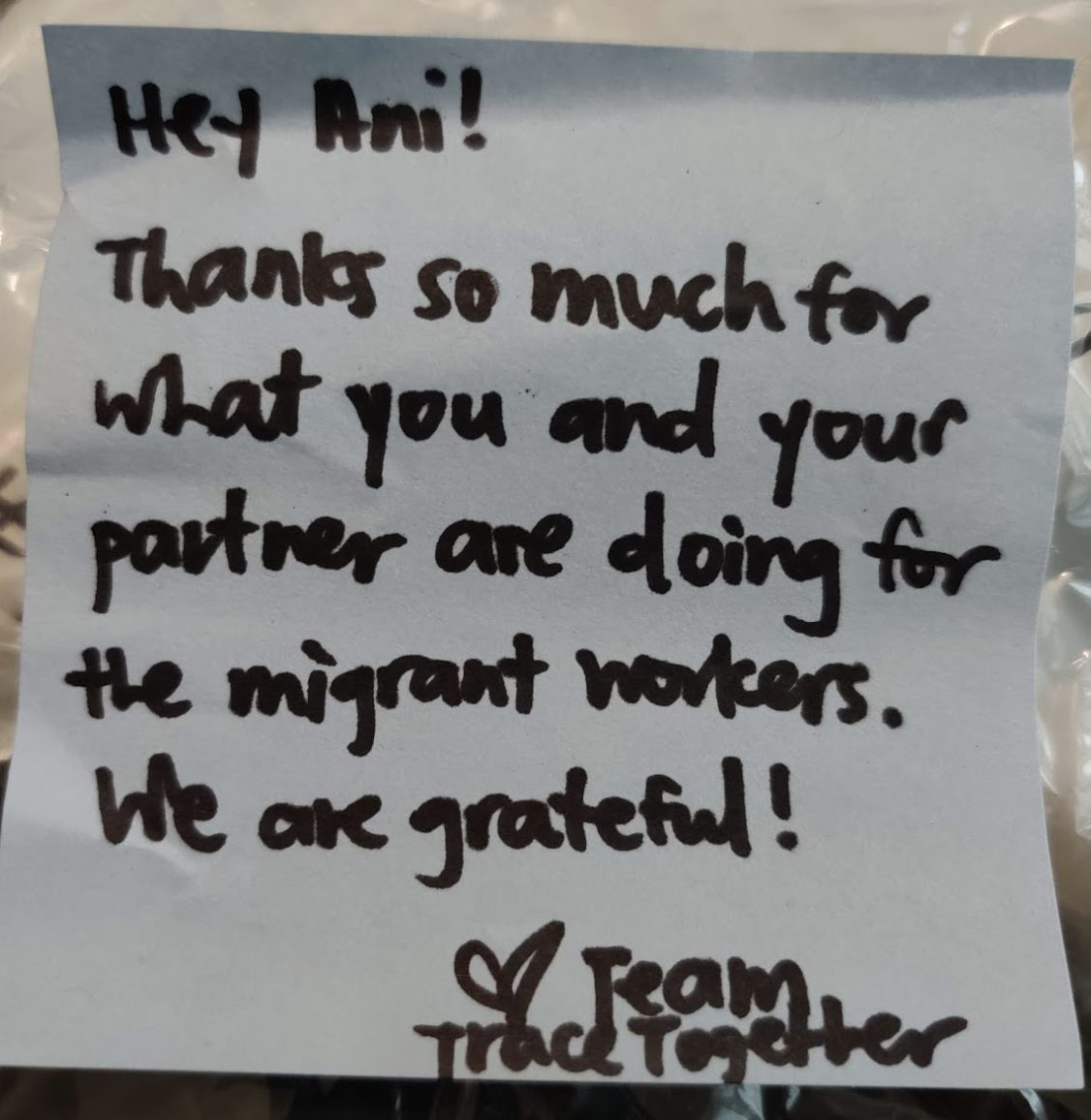
<p>And, I got a cool TraceTogether T as a token of appreciation :')</p>
<p><!-- /wp:paragraph --></p>
<p><!-- wp:gallery {"ids":[473,474]} --></p>
<figure class="wp-block-gallery columns-2 is-cropped">
<ul class="blocks-gallery-grid">
<li class="blocks-gallery-item">
<figure><img src="https://adhikary.net/wp-content/uploads/2020/08/Screenshot-2020-08-08-at-10.01.21-AM-1.png" alt="" data-id="473" data-full-url="https://adhikary.net/wp-content/uploads/2020/08/Screenshot-2020-08-08-at-10.01.21-AM-1.png" data-link="https://adhikary.net/?attachment_id=473" class="wp-image-473"/></figure>
</li>
<li class="blocks-gallery-item">
<figure><img src="https://adhikary.net/wp-content/uploads/2020/08/Screenshot-2020-08-08-at-10.01.32-AM.png" alt="" data-id="474" data-full-url="https://adhikary.net/wp-content/uploads/2020/08/Screenshot-2020-08-08-at-10.01.32-AM.png" data-link="https://adhikary.net/?attachment_id=474" class="wp-image-474"/></figure>
</li>
</ul>
</figure>
<p><!-- /wp:gallery --></p>
<p><!-- wp:paragraph --></p>
<p>I was blown away to know the had made the time to arrange this, out of their insanely busy schedules.</p>
<p><!-- /wp:paragraph --></p>]]></content><author><name>Aniruddha Adhikary</name></author><category term="Uncategorized" /><summary type="html"><![CDATA[When TraceTogether was rolled out in Singapore, I geeked out with the BlueTrace Protocol and the basics of how it worked. However, with my experience of volunteering for the migrant population, I knew that we needed translations, badly. We needed translations if we wanted to an effective deployment of TraceTogether in the vulnerable population. With their little command over English, would most migrant of the migrant brothers be able to effectively use TraceTogether? Tracing the Contacts I immediately texted everyone I knew, working with GovTech or SingHealth. I contacted GovTech on a few channels to connect me to the right person. I was surprised at the speed they responded with contacts! Finally, along with active help from Sudesna, a recent NUS-grad young physician, I got a few contacts to move forward. Meanwhile I was anxious to get the translations rolled out. I needed to start translating by the time I reached the correct person-in-charge. So, as any sane human would do, I started a Google Sheet, and tried to type in text from the app interface. Soon however, I realised this was unsustainable as some of the hidden screens would remain untranslated. So, I took the Android app, and started reverse-engineering. I used a tool named apktool to decompile the app, and looked for the file containing all the "strings of text" used throughout the app. Luckily, I did find the English resources file. However, it was XML, and I needed to spit out a CSV/Excel file for it to be any good. Developers always try to automate everything. Spirited, I did write a simple Python script to convert this document into a CSV, uploaded to Google Sheets and started translating. I was happy. I felt relieved. Now, all I had to do was to hand this over to the responsible team to be implemented. The Contact! Finally I found a person from the Hive Team coordinating UI/UX efforts of TraceTogether. They were delighted to see the efforts, however had to let me know that, the (then) current version of the app wasn't designed to be multilingual, and a new version with new strings would be released soon! Altho, not all of TraceTogether was translated by individual contributors from the members of the public. My translations were partially accepted to some of the untranslated parts of TraceTogether. The Team was very aware of the need of the migrant population, and started their own effort of translation even before me! However, as people with hearts, they always did try to encourage us volunteers, and made opportunities for us to contribute here and there. We started working to translate the newer features of the app. One of the first features I translated, was the SafeEntry check-in feature. I still get excited to see my translations on the app. I believe allowing the public to participate is empowering us, giving us a feeling of achievement as we could contribute as much as we could, in helping to keep this tiny island we call home, safe. Thanks, the HIVE TEAM! The Cool T And, I got a cool TraceTogether T as a token of appreciation :') I was blown away to know the had made the time to arrange this, out of their insanely busy schedules.]]></summary></entry><entry><title type="html">GovTech SafeEntry and TraceTogether Posters in Bengali (Bangla)</title><link href="https://adhikary.net/2020/05/31/govtech-safeentry-and-tracetogether-posters-in-bengali-bangla" rel="alternate" type="text/html" title="GovTech SafeEntry and TraceTogether Posters in Bengali (Bangla)" /><published>2020-05-30T23:00:05+00:00</published><updated>2020-05-30T23:00:05+00:00</updated><id>https://adhikary.net/2020/05/31/govtech-safeentry-and-tracetogether-posters-in-bengali-bangla</id><content type="html" xml:base="https://adhikary.net/2020/05/31/govtech-safeentry-and-tracetogether-posters-in-bengali-bangla"><![CDATA[<p><!-- wp:paragraph --></p>
<p>Seen those SafeEntry posters in Singapore, with instructions to "log in" to your neighborhood 7-Eleven? I have translated those into Bengali (Bangla) ahead of the reopening of Singapore, from the circuit breaker. These have been translated in the hope of protecting our migrant workers and the community amidst the uncertainty.</p>
<p><!-- /wp:paragraph --></p>
<p><!-- wp:more --><br />
<!--more--><br />
<!-- /wp:more --></p>
<p><!-- wp:heading {"level":3} --></p>
<h3>What is this?</h3>
<p><!-- /wp:heading --></p>
<p><!-- wp:paragraph --></p>
<p>SafeEntry is a simple contact tracing system used by the Government of Singapore as a measure to track the spread of COVID-19. Shops, malls, officers, and other public places put posters out instructing visitors on how to sign in. Those are now available in Bengali!</p>
<p><!-- /wp:paragraph --></p>
<p><!-- wp:group --></p>
<div class="wp-block-group"><!-- wp:jetpack/tiled-gallery {"columnWidths":[["24.98957","24.98562","25.03918","24.98562"]],"ids":[421,422,420,423]} --></p>
<div class="wp-block-jetpack-tiled-gallery aligncenter is-style-rectangular">
<div class="tiled-gallery__gallery">
<div class="tiled-gallery__row">
<div class="tiled-gallery__col" style="flex-basis:24.98957%">
<figure class="tiled-gallery__item"><img alt="" data-height="8910" data-id="421" data-link="https://adhikary.net/en/2020/05/31/govtech-safeentry-and-tracetogether-posters-in-bengali-bangla/bengali-why-use-tracetogether/" data-url="https://adhikary.net/wp-content/uploads/2020/05/Bengali-Why-use-TraceTogether.png" data-width="6301" src="https://i1.wp.com/adhikary.net/wp-content/uploads/2020/05/Bengali-Why-use-TraceTogether.png?ssl=1" data-amp-layout="responsive"/></figure>
</div>
<div class="tiled-gallery__col" style="flex-basis:24.98562%">
<figure class="tiled-gallery__item"><img alt="" data-height="1980" data-id="422" data-link="https://adhikary.net/en/2020/05/31/govtech-safeentry-and-tracetogether-posters-in-bengali-bangla/bengali-portrait-safeentry-mobile-_empty/" data-url="https://adhikary.net/wp-content/uploads/2020/05/Bengali-Portrait-SafeEntry-Mobile-_Empty.jpg" data-width="1400" src="https://i0.wp.com/adhikary.net/wp-content/uploads/2020/05/Bengali-Portrait-SafeEntry-Mobile-_Empty.jpg?ssl=1" data-amp-layout="responsive"/></figure>
</div>
<div class="tiled-gallery__col" style="flex-basis:25.03918%">
<figure class="tiled-gallery__item"><img alt="" data-height="2560" data-id="420" data-link="https://adhikary.net/en/2020/05/31/govtech-safeentry-and-tracetogether-posters-in-bengali-bangla/bengali-use-singpass-mobile-for-safeentry-check-ins-poster-final/" data-url="https://adhikary.net/wp-content/uploads/2020/05/Bengali-Use-SingPass-Mobile-for-SafeEntry-Check-Ins-Poster-Final-scaled.jpg" data-width="1814" src="https://i0.wp.com/adhikary.net/wp-content/uploads/2020/05/Bengali-Use-SingPass-Mobile-for-SafeEntry-Check-Ins-Poster-Final-scaled.jpg?ssl=1" data-amp-layout="responsive"/></figure>
</div>
<div class="tiled-gallery__col" style="flex-basis:24.98562%">
<figure class="tiled-gallery__item"><img alt="" data-height="1980" data-id="423" data-link="https://adhikary.net/en/2020/05/31/govtech-safeentry-and-tracetogether-posters-in-bengali-bangla/small_bengali_safeentry_nric_instructions_poster/" data-url="https://adhikary.net/wp-content/uploads/2020/05/Small_Bengali_SafeEntry_NRIC_Instructions_Poster.jpg" data-width="1400" src="https://i0.wp.com/adhikary.net/wp-content/uploads/2020/05/Small_Bengali_SafeEntry_NRIC_Instructions_Poster.jpg?ssl=1" data-amp-layout="responsive"/></figure>
</div>
</div>
</div>
</div>
<p><!-- /wp:jetpack/tiled-gallery --></div>
<p><!-- /wp:group --></p>
<p><!-- wp:heading {"level":3} --></p>
<h3>Download Posters</h3>
<p><!-- /wp:heading --></p>
<p><!-- wp:paragraph --></p>
<p>[Links removed as they are no longer relevant in Singapore]</p>
<p><!-- /wp:paragraph --></p>
<p><!-- wp:paragraph --></p>
<p><!-- /wp:paragraph --></p>]]></content><author><name>Aniruddha Adhikary</name></author><category term="Uncategorized" /><summary type="html"><![CDATA[Seen those SafeEntry posters in Singapore, with instructions to "log in" to your neighborhood 7-Eleven? I have translated those into Bengali (Bangla) ahead of the reopening of Singapore, from the circuit breaker. These have been translated in the hope of protecting our migrant workers and the community amidst the uncertainty. What is this? SafeEntry is a simple contact tracing system used by the Government of Singapore as a measure to track the spread of COVID-19. Shops, malls, officers, and other public places put posters out instructing visitors on how to sign in. Those are now available in Bengali! Download Posters [Links removed as they are no longer relevant in Singapore]]]></summary></entry><entry><title type="html">Encoding Bangla (Unicode) SMS for SSLWireless in Python</title><link href="https://adhikary.net/2019/07/15/encoding-bangla-unicode-sms-for-sslwireless-in-python" rel="alternate" type="text/html" title="Encoding Bangla (Unicode) SMS for SSLWireless in Python" /><published>2019-07-15T07:17:26+00:00</published><updated>2019-07-15T07:17:26+00:00</updated><id>https://adhikary.net/2019/07/15/encoding-bangla-unicode-sms-for-sslwireless-in-python</id><content type="html" xml:base="https://adhikary.net/2019/07/15/encoding-bangla-unicode-sms-for-sslwireless-in-python"><![CDATA[<p><!-- wp:paragraph --></p>
<p>If you are wondering why you cannot send Bengali text encoded in Unicode properly through the SSLWireless Push API in Python, well you are not alone. The solution is, encoding your UTF-8 text into UTF-16 (Big Endian) and then taking the hexadecimal value of it, transformed into uppercase.</p>
<p><!-- /wp:paragraph --></p>
<p><!-- wp:more --><br />
<!--more--><br />
<!-- /wp:more --></p>
<p><!-- wp:code --></p>
<pre class="wp-block-code"><code>def encode(message):
    return message.encode('utf-16-be').hex().upper()</code></pre>
<p><!-- /wp:code --></p>
<p><!-- wp:paragraph --></p>
<p>Let's witness this step by step.</p>
<p><!-- /wp:paragraph --></p>
<p><!-- wp:code --></p>
<pre class="wp-block-code"><code>>>> message = 'আমার সোনার বাংলা'
>>> message
'আমার সোনার বাংলা'
>>> message.encode('utf-16-be')
b'\t\x86\t\xae\t\xbe\t\xb0\x00 \t\xb8\t\xcb\t\xa8\t\xbe\t\xb0\x00 \t\xac\t\xbe\t\x82\t\xb2\t\xbe'
>>> message.encode('utf-16-be').hex()
'098609ae09be09b0002009b809cb09a809be09b0002009ac09be098209b209be'
>>> message.encode('utf-16-be').hex().upper()
'098609AE09BE09B0002009B809CB09A809BE09B0002009AC09BE098209B209BE'</code></pre>
<p><!-- /wp:code --></p>
<p><!-- wp:paragraph --></p>
<p>And that is how it is done. Hope it helped! N.B. The rest of the details about how to perform a request, are in the documentation you have received from SSLWireless.</p>
<p><!-- /wp:paragraph --></p>]]></content><author><name>Aniruddha Adhikary</name></author><category term="Uncategorized" /><category term="python" /><summary type="html"><![CDATA[If you are wondering why you cannot send Bengali text encoded in Unicode properly through the SSLWireless Push API in Python, well you are not alone. The solution is, encoding your UTF-8 text into UTF-16 (Big Endian) and then taking the hexadecimal value of it, transformed into uppercase. def encode(message): return message.encode('utf-16-be').hex().upper() Let's witness this step by step. >>> message = 'আমার সোনার বাংলা' >>> message 'আমার সোনার বাংলা' >>> message.encode('utf-16-be') b'\t\x86\t\xae\t\xbe\t\xb0\x00 \t\xb8\t\xcb\t\xa8\t\xbe\t\xb0\x00 \t\xac\t\xbe\t\x82\t\xb2\t\xbe' >>> message.encode('utf-16-be').hex() '098609ae09be09b0002009b809cb09a809be09b0002009ac09be098209b209be' >>> message.encode('utf-16-be').hex().upper() '098609AE09BE09B0002009B809CB09A809BE09B0002009AC09BE098209B209BE' And that is how it is done. Hope it helped! N.B. The rest of the details about how to perform a request, are in the documentation you have received from SSLWireless.]]></summary></entry><entry><title type="html">BSc in Computer Science Distance Learning at UoL: Why I chose it</title><link href="https://adhikary.net/2019/07/06/uol-bsc-cs-why" rel="alternate" type="text/html" title="BSc in Computer Science Distance Learning at UoL: Why I chose it" /><published>2019-07-06T04:24:02+00:00</published><updated>2019-07-06T04:24:02+00:00</updated><id>https://adhikary.net/2019/07/06/uol-bsc-cs-why</id><content type="html" xml:base="https://adhikary.net/2019/07/06/uol-bsc-cs-why"><![CDATA[<p><!-- wp:paragraph --></p>
<p>I am a self-taught Software Engineer working in the industry for about 5 years. However, formal tertiary education has always been on my radar. This blog post describes my story, and why I chose a distance learning programme instead of an on-campus offering.</p>
<p><!-- /wp:paragraph --></p>
<p><!-- wp:more --><br />
<!--more--><br />
<!-- /wp:more --></p>
<p><!-- wp:heading --></p>
<h2>Unconventional Beginnings</h2>
<p><!-- /wp:heading --></p>
<p><!-- wp:paragraph --></p>
<p>So, here is the standard path for a Computer Science career - you pass high school, go to college to study CS, learn to code, intern at a company and then get a full time role at a Software company. I exactly didn&rsquo;t follow this set standard.</p>
<p><!-- /wp:paragraph --></p>
<p><!-- wp:paragraph --></p>
<p>I started coding in 8th grade. I had my first serious internship handling consumer services at 10th grade. I wrote Android system components and firmware at 12th grade. When I got admitted into a brick-and-morter university for a B.Sc, I already started developing globally distributed web crawling and news aggregation systems.</p>
<p><!-- /wp:paragraph --></p>
<p><!-- wp:paragraph --></p>
<p>At it turned out, continuing my university classes with strict attendance requirements was becoming impossible as I positioned myself as one of the senior resources at my organization. I had taken more responsibilties, tougher challanges. I struggled to do well in my university exams, and grades plummetted. At one point, I was so far behind my peers, I couldn&rsquo;t complete half of my course requirements in 3 years. Full time work and fighting through Mirpur (Dhaka) traffic meant, I stayed outdoors from 7 AM - 8 PM.</p>
<p><!-- /wp:paragraph --></p>
<p><!-- wp:paragraph --></p>
<p>Bad grades, not being able to attend classes became an issue. Although my employer had no issue with me taking classes during work hours, I felt that I deprived my employer of my precious work hours. I had to do something to get back my results, get more time to study and be fair with my employer.</p>
<p><!-- /wp:paragraph --></p>
<p><!-- wp:heading --></p>
<h2>My Options</h2>
<p><!-- /wp:heading --></p>
<p><!-- wp:paragraph --></p>
<p>I essentially had four options at hand.</p>
<p><!-- /wp:paragraph --></p>
<p><!-- wp:list {"ordered":true} --></p>
<ol>
<li>Continue as it is. Graduate in 3 more years (totalling 6) with terrible grades while risking my performance at work.</li>
<li>Getting admitted into another local university where an evening CSE programme is offered.</li>
<li>Leaving my emloyment, becoming a full-time student and passing in 1.5 - 2 years.</li>
<li>Enrolling into an accredited and respected distance learning programme to continue my education alongside my professional work.</li>
</ol>
<p><!-- /wp:list --></p>
<p><!-- wp:paragraph --></p>
<p>My family had not been in a position to support my education without any income contribution from me. Number 3 could be crossed off. Considering Dhaka traffic, the reputation of universities offering evening programmes, I decided to back off of number 2. Number 1 was just impractical, leaving me with number 4. </p>
<p><!-- /wp:paragraph --></p>
<p><!-- wp:heading --></p>
<h2>Taking the plunge</h2>
<p><!-- /wp:heading --></p>
<p><!-- wp:paragraph --></p>
<p>I researched a lot. Foreign degrees are valued in foreign currency, most beyond the reach of my income level. Many were affordable, but were questionable and not as respected. After a few months of research, I stumbled upon the programmes offered by the University of London. After some digging, I found that the university has a track record of successful distance learning programmes.</p>
<p><!-- /wp:paragraph --></p>
<p><!-- wp:paragraph --></p>
<p>I myself was skeptical. Many of my well-wishers from the academia and industry reminded of the grey area status of distance learning programmes. I had to make a choice. I chose to continue with distance learning. I had already built a comparatively successful portfolio of work and past experiences working for major organizations and products. My target was to tick the degree checkbox.</p>
<p><!-- /wp:paragraph --></p>
<p><!-- wp:paragraph --></p>
<p>I understood that my degree from Bangladesh would bear comparatively little value for my resume. I consulted a few foreign ministries to check the recognition of the distance learning programmes of the Uniersity of London. Namely, Ministry Of Manpower (Singapore). To my surprise, it was <a href="https://www.mom.gov.sg/eservices/services/employment-s-pass-self-assessment-tool">ranked higher</a> than all of the Bachelors degrees offered from Bangladeshi universities (public and private). </p>
<p><!-- /wp:paragraph --></p>
<p><!-- wp:paragraph --></p>
<p>I knew I was probably on the right track. I had more confidence. I applied. I got an offer, accepted and started the programme. I transferred from NSU to UoL.</p>
<p><!-- /wp:paragraph --></p>
<p><!-- wp:paragraph --></p>
<p>So this is my story in short. Please remember that, distance learning programmes aren&rsquo;t accepted everywhere. Do your homework before you decide to commit. I am in no way an educational consultant, just an average human sharing my story. If you want to hear more about this, or maybe how I applied and other stuff - leave a comment to let me know.</p>
<p><!-- /wp:paragraph --></p>]]></content><author><name>Aniruddha Adhikary</name></author><category term="Uncategorized" /><summary type="html"><![CDATA[I am a self-taught Software Engineer working in the industry for about 5 years. However, formal tertiary education has always been on my radar. This blog post describes my story, and why I chose a distance learning programme instead of an on-campus offering. Unconventional Beginnings So, here is the standard path for a Computer Science career - you pass high school, go to college to study CS, learn to code, intern at a company and then get a full time role at a Software company. I exactly didn&rsquo;t follow this set standard. I started coding in 8th grade. I had my first serious internship handling consumer services at 10th grade. I wrote Android system components and firmware at 12th grade. When I got admitted into a brick-and-morter university for a B.Sc, I already started developing globally distributed web crawling and news aggregation systems. At it turned out, continuing my university classes with strict attendance requirements was becoming impossible as I positioned myself as one of the senior resources at my organization. I had taken more responsibilties, tougher challanges. I struggled to do well in my university exams, and grades plummetted. At one point, I was so far behind my peers, I couldn&rsquo;t complete half of my course requirements in 3 years. Full time work and fighting through Mirpur (Dhaka) traffic meant, I stayed outdoors from 7 AM - 8 PM. Bad grades, not being able to attend classes became an issue. Although my employer had no issue with me taking classes during work hours, I felt that I deprived my employer of my precious work hours. I had to do something to get back my results, get more time to study and be fair with my employer. My Options I essentially had four options at hand. Continue as it is. Graduate in 3 more years (totalling 6) with terrible grades while risking my performance at work. Getting admitted into another local university where an evening CSE programme is offered. Leaving my emloyment, becoming a full-time student and passing in 1.5 - 2 years. Enrolling into an accredited and respected distance learning programme to continue my education alongside my professional work. My family had not been in a position to support my education without any income contribution from me. Number 3 could be crossed off. Considering Dhaka traffic, the reputation of universities offering evening programmes, I decided to back off of number 2. Number 1 was just impractical, leaving me with number 4. Taking the plunge I researched a lot. Foreign degrees are valued in foreign currency, most beyond the reach of my income level. Many were affordable, but were questionable and not as respected. After a few months of research, I stumbled upon the programmes offered by the University of London. After some digging, I found that the university has a track record of successful distance learning programmes. I myself was skeptical. Many of my well-wishers from the academia and industry reminded of the grey area status of distance learning programmes. I had to make a choice. I chose to continue with distance learning. I had already built a comparatively successful portfolio of work and past experiences working for major organizations and products. My target was to tick the degree checkbox. I understood that my degree from Bangladesh would bear comparatively little value for my resume. I consulted a few foreign ministries to check the recognition of the distance learning programmes of the Uniersity of London. Namely, Ministry Of Manpower (Singapore). To my surprise, it was ranked higher than all of the Bachelors degrees offered from Bangladeshi universities (public and private). I knew I was probably on the right track. I had more confidence. I applied. I got an offer, accepted and started the programme. I transferred from NSU to UoL. So this is my story in short. Please remember that, distance learning programmes aren&rsquo;t accepted everywhere. Do your homework before you decide to commit. I am in no way an educational consultant, just an average human sharing my story. If you want to hear more about this, or maybe how I applied and other stuff - leave a comment to let me know.]]></summary></entry><entry><title type="html">I didn’t “Hack” Your Site</title><link href="https://adhikary.net/2019/04/25/i-didnt-hack-your-site" rel="alternate" type="text/html" title="I didn’t “Hack” Your Site" /><published>2019-04-25T08:37:20+00:00</published><updated>2019-04-25T08:37:20+00:00</updated><id>https://adhikary.net/2019/04/25/i-didnt-hack-your-site</id><content type="html" xml:base="https://adhikary.net/2019/04/25/i-didnt-hack-your-site"><![CDATA[<p><!-- wp:paragraph --></p>
<p>If you are seeing my website instead of the one you're supposed to see, this post is for you. I sharing a hosting server with several hundreds of people. That server had a hardware failure, and backups are being restored as I speak.</p>
<p><!-- /wp:paragraph --></p>
<p><!-- wp:heading {"level":3} --></p>
<h3>Why are you seeing my site?</h3>
<p><!-- /wp:heading --></p>
<p><!-- wp:paragraph --></p>
<p>My Domain starts with the letter <code>A</code>. Thus, it was copied to the server from a backup first. Even before the <code>default</code>  file, as it starts with <code>D</code>. So, for a brief period, you saw my site. Till that default got copied over.</p>
<p><!-- /wp:paragraph --></p>
<p><!-- wp:paragraph --></p>
<p>I didn't hack you.</p>
<p><!-- /wp:paragraph --></p>
<p><!-- wp:paragraph --></p>
<p>Please contact your hosting provider.<br></p>
<p><!-- /wp:paragraph --></p>]]></content><author><name>Aniruddha Adhikary</name></author><category term="Uncategorized" /><summary type="html"><![CDATA[If you are seeing my website instead of the one you're supposed to see, this post is for you. I sharing a hosting server with several hundreds of people. That server had a hardware failure, and backups are being restored as I speak. Why are you seeing my site? My Domain starts with the letter A. Thus, it was copied to the server from a backup first. Even before the default file, as it starts with D. So, for a brief period, you saw my site. Till that default got copied over. I didn't hack you. Please contact your hosting provider.]]></summary></entry><entry><title type="html">Categorical and Numeric Data in Scikit-Learn Pipelines</title><link href="https://adhikary.net/2019/03/23/categorical-and-numeric-data-in-scikit-learn-pipelines" rel="alternate" type="text/html" title="Categorical and Numeric Data in Scikit-Learn Pipelines" /><published>2019-03-23T01:46:43+00:00</published><updated>2019-03-23T01:46:43+00:00</updated><id>https://adhikary.net/2019/03/23/categorical-and-numeric-data-in-scikit-learn-pipelines</id><content type="html" xml:base="https://adhikary.net/2019/03/23/categorical-and-numeric-data-in-scikit-learn-pipelines"><![CDATA[<p><!-- wp:paragraph --></p>
<p>I always tend to organize every aspect of my experiments with organizers as useful as <code>Pipeline</code>. However, one shouldn't be passing continuous variables into a <code>OneHotEncoder</code> or vice versa for Scalers. The solution is, split your data, treat them in separate pipelines before merging them together again. Inspired by <a href="https://scikit-learn.org/stable/auto_examples/compose/plot_column_transformer_mixed_types.html">Scikit Learn Examples</a>.</p>
<p><!-- /wp:paragraph --></p>
<p><!-- wp:more --><br />
<!--more--><br />
<!-- /wp:more --></p>
<p><!-- wp:image {"id":293} --></p>
<figure class="wp-block-image"><img src="https://i2.wp.com/adhikary.net/wp-content/uploads/2019/03/Screenshot-from-2019-03-23-09-22-51.png?fit=660%2C371&amp;ssl=1" alt="" class="wp-image-293"/><br />
<figcaption>Simplified Operation Graph</figcaption>
</figure>
<p><!-- /wp:image --></p>
<p><!-- wp:heading {"level":3} --></p>
<h3>Identifying the Columns / Features</h3>
<p><!-- /wp:heading --></p>
<p><!-- wp:paragraph --></p>
<p>The first step, definitely, is to identify which columns are <strong>categorical </strong>and which are <strong>numeric</strong>.</p>
<p><!-- /wp:paragraph --></p>
<p><!-- wp:preformatted --></p>
<pre class="wp-block-preformatted">numeric_features = [<strong>'salary'</strong>, <strong>'zone_count'</strong>, <strong>'staff_count'</strong>]<br>categorical_features = [<strong>'rank'</strong>, <strong>'district'</strong>]</pre>
<p><!-- /wp:preformatted --></p>
<p><!-- wp:paragraph --></p>
<p>I found a super cool way to achieve this automatically (I forgot the source, will mention it once I find it).</p>
<p><!-- /wp:paragraph --></p>
<p><!-- wp:preformatted --></p>
<pre class="wp-block-preformatted">categorical_feature_mask = df.dtypes==object<br>categorical_features = df.columns[categorical_feature_mask].tolist()</pre>
<p><!-- /wp:preformatted --></p>
<p><!-- wp:preformatted --></p>
<pre class="wp-block-preformatted">numeric_feature_mask = df.dtypes!=object<br>numeric_features = df.columns[numeric_feature_mask].tolist()</pre>
<p><!-- /wp:preformatted --></p>
<p><!-- wp:paragraph --></p>
<p>This again works on the belief that categorical features are not being represented by numbers. However, <strong>often numbers can be categorical features</strong>! Be careful while using this neat trick and do consider whether all your apparently numerical features are numeric after all!</p>
<p><!-- /wp:paragraph --></p>
<p><!-- wp:heading {"level":3} --></p>
<h3>Setting up Numeric and Categorical Pipelines</h3>
<p><!-- /wp:heading --></p>
<p><!-- wp:paragraph --></p>
<p>First, I am setting up my pipeline for the categorical data I have. (Yeah with one step!)</p>
<p><!-- /wp:paragraph --></p>
<p><!-- wp:preformatted --></p>
<pre class="wp-block-preformatted">from sklearn.pipeline import <strong>Pipeline</strong><br>from sklearn.preprocessing import <strong>OneHotEncoder</strong><br><br>categorical_transformer = <strong>Pipeline</strong>(steps=[<br>    (<strong>'onehot'</strong>, <strong>OneHotEncoder</strong>(handle_unknown=<strong>'ignore'</strong>)),<br>])</pre>
<p><!-- /wp:preformatted --></p>
<p><!-- wp:paragraph --></p>
<p>Next up, let's setup the pipeline for our numeric values.</p>
<p><!-- /wp:paragraph --></p>
<p><!-- wp:preformatted --></p>
<pre class="wp-block-preformatted">from sklearn.impute import <strong>SimpleImputer</strong><br>from sklearn.preprocessing import <strong>StandardScaler</strong><br><br>numeric_transformer = <strong>Pipeline</strong>(steps=[<br>    (<strong>'imputer'</strong>, <strong>SimpleImputer</strong>(strategy=<strong>'median'</strong>)),<br>    (<strong>'scaler'</strong>, <strong>StandardScaler</strong>()),<br>])</pre>
<p><!-- /wp:preformatted --></p>
<p><!-- wp:paragraph --></p>
<p>And we are done with this phase. Let's move on and combine these two pipelines!</p>
<p><!-- /wp:paragraph --></p>
<p><!-- wp:heading {"level":3} --></p>
<h3>The Great Join</h3>
<p><!-- /wp:heading --></p>
<p><!-- wp:paragraph --></p>
<p>We'll be using a <code>ColumnTransformer</code> for this bit. Let's combine these transformation pipelines.</p>
<p><!-- /wp:paragraph --></p>
<p><!-- wp:preformatted --></p>
<pre class="wp-block-preformatted">from sklearn.compose import <strong>ColumnTransformer</strong><br><br>preprocessor = <strong>ColumnTransformer</strong>(<br>    transformers=[<br>        (<strong>'num'</strong>, numeric_transformer, numeric_features),<br>        (<strong>'cat'</strong>, categorical_transformer, categorical_features)<br>    ]<br>)</pre>
<p><!-- /wp:preformatted --></p>
<p><!-- wp:paragraph --></p>
<p>Awesome! And we have the separated pipelines being used from a <code>ColumnTransformer</code> now.</p>
<p><!-- /wp:paragraph --></p>
<p><!-- wp:heading {"level":3} --></p>
<h3>Constructing the Main Pipe</h3>
<p><!-- /wp:heading --></p>
<p><!-- wp:paragraph --></p>
<p>Now, the part you've been waiting for, actually using everything we've done to feed into a Classifier, Regressor or something else. </p>
<p><!-- /wp:paragraph --></p>
<p><!-- wp:preformatted --></p>
<pre class="wp-block-preformatted">from sklearn.ensemble import <strong>RandomCityClassifier</strong><br><br>clf = <strong>Pipeline</strong>([<br>     ('preprocessor', preprocessor),<br>     ('clf', <strong>RandomCityClassifier</strong>())<br>])</pre>
<p><!-- /wp:preformatted --></p>
<p><!-- wp:paragraph --></p>
<p>Now use the pipeline as usual, fit your data, predict on test data, do benchmarks, and maybe deploy!</p>
<p><!-- /wp:paragraph --></p>
<p><!-- wp:paragraph --></p>
<p>Thanks for reading through! If you liked this simplified and broken down explanation, please do not forget to share it with your friends. Why not leave your thoughts in the comments below?</p>
<p><!-- /wp:paragraph --></p>]]></content><author><name>Aniruddha Adhikary</name></author><category term="Uncategorized" /><category term="scikit-learn" /><summary type="html"><![CDATA[I always tend to organize every aspect of my experiments with organizers as useful as Pipeline. However, one shouldn't be passing continuous variables into a OneHotEncoder or vice versa for Scalers. The solution is, split your data, treat them in separate pipelines before merging them together again. Inspired by Scikit Learn Examples. Simplified Operation Graph Identifying the Columns / Features The first step, definitely, is to identify which columns are categorical and which are numeric. numeric_features = ['salary', 'zone_count', 'staff_count']categorical_features = ['rank', 'district'] I found a super cool way to achieve this automatically (I forgot the source, will mention it once I find it). categorical_feature_mask = df.dtypes==objectcategorical_features = df.columns[categorical_feature_mask].tolist() numeric_feature_mask = df.dtypes!=objectnumeric_features = df.columns[numeric_feature_mask].tolist() This again works on the belief that categorical features are not being represented by numbers. However, often numbers can be categorical features! Be careful while using this neat trick and do consider whether all your apparently numerical features are numeric after all! Setting up Numeric and Categorical Pipelines First, I am setting up my pipeline for the categorical data I have. (Yeah with one step!) from sklearn.pipeline import Pipelinefrom sklearn.preprocessing import OneHotEncodercategorical_transformer = Pipeline(steps=[ ('onehot', OneHotEncoder(handle_unknown='ignore')),]) Next up, let's setup the pipeline for our numeric values. from sklearn.impute import SimpleImputerfrom sklearn.preprocessing import StandardScalernumeric_transformer = Pipeline(steps=[ ('imputer', SimpleImputer(strategy='median')), ('scaler', StandardScaler()),]) And we are done with this phase. Let's move on and combine these two pipelines! The Great Join We'll be using a ColumnTransformer for this bit. Let's combine these transformation pipelines. from sklearn.compose import ColumnTransformerpreprocessor = ColumnTransformer( transformers=[ ('num', numeric_transformer, numeric_features), ('cat', categorical_transformer, categorical_features) ]) Awesome! And we have the separated pipelines being used from a ColumnTransformer now. Constructing the Main Pipe Now, the part you've been waiting for, actually using everything we've done to feed into a Classifier, Regressor or something else. from sklearn.ensemble import RandomCityClassifierclf = Pipeline([ ('preprocessor', preprocessor), ('clf', RandomCityClassifier())]) Now use the pipeline as usual, fit your data, predict on test data, do benchmarks, and maybe deploy! Thanks for reading through! If you liked this simplified and broken down explanation, please do not forget to share it with your friends. Why not leave your thoughts in the comments below?]]></summary></entry><entry><title type="html">Counting Weekends between Two Dates in PostgreSQL</title><link href="https://adhikary.net/2019/03/22/counting-weekends-between-two-dates-in-postgresql" rel="alternate" type="text/html" title="Counting Weekends between Two Dates in PostgreSQL" /><published>2019-03-22T13:55:28+00:00</published><updated>2019-03-22T13:55:28+00:00</updated><id>https://adhikary.net/2019/03/22/counting-weekends-between-two-dates-in-postgresql</id><content type="html" xml:base="https://adhikary.net/2019/03/22/counting-weekends-between-two-dates-in-postgresql"><![CDATA[<p><!-- wp:paragraph --></p>
<p>I found myself the problem of counting the occurrence of specific "days of the week" between two dates; for, of course, generating features for a predictive analysis task. For example, the number of Fridays and Saturdays between 2019-01-01 and 2019-01-15. And thankfully, good old PostgreSQL came to the rescue!</p>
<p><!-- /wp:paragraph --></p>
<p><!-- wp:more --><br />
<!--more--><br />
<!-- /wp:more --></p>
<p><!-- wp:heading {"level":3} --></p>
<h3>Introducing <em>generate_series</em></h3>
<p><!-- /wp:heading --></p>
<p><!-- wp:preformatted --></p>
<pre class="wp-block-preformatted"><strong>SELECT</strong> * <strong>FROM</strong> generate_series(<strong>1</strong>, <strong>5</strong>);</pre>
<p><!-- /wp:preformatted --></p>
<p><!-- wp:preformatted --></p>
<pre class="wp-block-preformatted">generate_series <br><code>            1</code><br><code>            2</code><br><code>            3</code><br><code>            4</code><br><code>            5</code><br> (5 rows)</pre>
<p><!-- /wp:preformatted --></p>
<p><!-- wp:paragraph --></p>
<p>And, if we want to spice it up by setting the interval, we can do that too! Let's make a list of all the ODD numbers between 1 and 10 (inclusive).</p>
<p><!-- /wp:paragraph --></p>
<p><!-- wp:preformatted --></p>
<pre class="wp-block-preformatted"><strong>SELECT</strong> * <strong>FROM</strong> generate_series(<strong>1</strong>, <strong>10</strong>, <strong>2</strong>);</pre>
<p><!-- /wp:preformatted --></p>
<p><!-- wp:preformatted --></p>
<pre class="wp-block-preformatted">generate_series <br><code>            1</code><br><code>            3</code><br><code>            5</code><br><code>            7</code><br><code>            9</code><br> (5 rows)</pre>
<p><!-- /wp:preformatted --></p>
<p><!-- wp:heading {"level":3} --></p>
<h3><em>generate_series</em> but with Dates</h3>
<p><!-- /wp:heading --></p>
<p><!-- wp:paragraph --></p>
<p>Let's try just plugging in Date Strings.</p>
<p><!-- /wp:paragraph --></p>
<p><!-- wp:preformatted --></p>
<pre class="wp-block-preformatted"><strong>SELECT</strong> * <strong>FROM</strong> generate_series(<strong>'2019-01-01'</strong>, <strong>'2019-01-15'</strong>);</pre>
<p><!-- /wp:preformatted --></p>
<p><!-- wp:preformatted --></p>
<pre class="wp-block-preformatted">[42725] ERROR: function generate_series(unknown, unknown) is not unique Hint: Could not choose a best candidate function. You might need to add explicit type casts.</pre>
<p><!-- /wp:preformatted --></p>
<p><!-- wp:paragraph --></p>
<p>Clearly, something is off. Ah, we didn't cast those values as Dates. Of course. Let's do it.</p>
<p><!-- /wp:paragraph --></p>
<p><!-- wp:preformatted --></p>
<pre class="wp-block-preformatted"><strong>SELECT</strong> * <strong>FROM</strong> generate_series(<strong>'2019-01-01'</strong>::date, <strong>'2019-01-15'</strong>::date);</pre>
<p><!-- /wp:preformatted --></p>
<p><!-- wp:preformatted --></p>
<pre class="wp-block-preformatted">[42883] ERROR: function generate_series(date, date) does not exist Hint: No function matches the given name and argument types. You might need to add explicit type casts. Position: 15</pre>
<p><!-- /wp:preformatted --></p>
<p><!-- wp:paragraph --></p>
<p>Okay that did identify our value as a date, but it still isn't working. The thing is, we need to provide the interval explicitly.  Let's do it!</p>
<p><!-- /wp:paragraph --></p>
<p><!-- wp:preformatted --></p>
<pre class="wp-block-preformatted"><strong>SELECT</strong> *<br><strong>FROM</strong> generate_series(<strong>'2019-01-01'</strong>::<strong>date</strong>, <strong>'2019-01-15'</strong>::<strong>date</strong>, <strong>'1 day'</strong>::<strong>interval</strong>);</pre>
<p><!-- /wp:preformatted --></p>
<p><!-- wp:preformatted --></p>
<pre class="wp-block-preformatted">generate_series     <br>2019-01-01 00:00:00+06<br>...<br>2019-01-15 00:00:00+06<br>(15 rows)</pre>
<p><!-- /wp:preformatted --></p>
<p><!-- wp:paragraph --></p>
<p>Alright! That worked like a charm! Of course, let's make it a bit prettier.</p>
<p><!-- /wp:paragraph --></p>
<p><!-- wp:preformatted --></p>
<pre class="wp-block-preformatted"><strong>SELECT s</strong>::<em>date</em><br><strong>FROM </strong><em>generate_series</em>(<strong>'2019-01-01'</strong>, <strong>'2019-01-15'</strong>, <strong>'1 day'</strong>::<strong>interval</strong>) <strong>s</strong>;</pre>
<p><!-- /wp:preformatted --></p>
<p><!-- wp:preformatted --></p>
<pre class="wp-block-preformatted">     s      <br>  2019-01-01<br>  ...<br>  2019-01-15<br> (15 rows)</pre>
<p><!-- /wp:preformatted --></p>
<p><!-- wp:paragraph --></p>
<p>Sweet! We can now generate the ranges required.</p>
<p><!-- /wp:paragraph --></p>
<p><!-- wp:heading {"level":3} --></p>
<h3>The Week of Day</h3>
<p><!-- /wp:heading --></p>
<p><!-- wp:paragraph --></p>
<p>I'll let the query and the results talk in this bit.</p>
<p><!-- /wp:paragraph --></p>
<p><!-- wp:preformatted --></p>
<pre class="wp-block-preformatted"><strong>SELECT<br>       s</strong>::<em>date</em>,<br>       <em>extract</em>(<strong>DOW from s</strong>),<br>       <em>to_char</em>(<strong>s</strong>, <strong>'day'</strong>)<br><strong>FROM </strong><em>generate_series</em>(<strong>'2019-01-01'</strong>, <strong>'2019-01-15'</strong>, <strong>'1 day'</strong>::<strong>interval</strong>) <strong>s</strong>;<br></pre>
<p><!-- /wp:preformatted --></p>
<p><!-- wp:preformatted --></p>
<pre class="wp-block-preformatted"><code>      s      | date_part |  to_char  </code><br> ------------+-----------+-----------<br>  2019-01-01 |         2 | tuesday  <br>  2019-01-02 |         3 | wednesday<br>  2019-01-03 |         4 | thursday <br>  2019-01-04 |         5 | friday   <br>  2019-01-05 |         6 | saturday <br>  2019-01-06 |         0 | sunday   <br>  ...<br>  2019-01-14 |         1 | monday   <br>  2019-01-15 |         2 | tuesday  <br> (15 rows)</pre>
<p><!-- /wp:preformatted --></p>
<p><!-- wp:paragraph --></p>
<p>Starting to make sense now? We can get a numeric value for the day of the week by extracting <code>DOW</code> from the interval. And getting the string representation is just as easy as calling <code>to_char</code>. Let's put a weekend constraint now. Check the mapping of days of the week on the table posted above.  That's how we got <code>5</code> and <code>6</code>; representing <code>Friday</code> and <code>Saturday</code>.</p>
<p><!-- /wp:paragraph --></p>
<p><!-- wp:preformatted --></p>
<pre class="wp-block-preformatted"><strong>SELECT s</strong>::<em>date</em>,<br>       <em>extract</em>(<strong>DOW from s</strong>),<br>       <em>to_char</em>(<strong>s</strong>, <strong>'day'</strong>)<br><strong>FROM </strong><em>generate_series</em>(<strong>'2019-01-01'</strong>, <strong>'2019-01-15'</strong>, <strong>'1 day'</strong>::<strong>interval</strong>) <strong>s<br>WHERE </strong><em>extract</em>(<strong>DOW from s</strong>) <strong>in </strong>(5, 6);</pre>
<p><!-- /wp:preformatted --></p>
<p><!-- wp:preformatted --></p>
<pre class="wp-block-preformatted"><code>      s      | date_part |  to_char  </code><br> ------------+-----------+-----------<br>  2019-01-04 |         5 | friday   <br>  2019-01-05 |         6 | saturday <br>  2019-01-11 |         5 | friday   <br>  2019-01-12 |         6 | saturday <br> (4 rows)</pre>
<p><!-- /wp:preformatted --></p>
<p><!-- wp:paragraph --></p>
<p>That's super cool! Now, let's <code>COUNT</code>!</p>
<p><!-- /wp:paragraph --></p>
<p><!-- wp:preformatted --></p>
<pre class="wp-block-preformatted"><strong>SELECT </strong><em>COUNT</em>(<em>*</em>)<br><strong>FROM </strong><em>generate_series</em>(<strong>'2019-01-01'</strong>, <strong>'2019-01-15'</strong>, <strong>'1 day'</strong>::<strong>interval</strong>) <strong>s<br>WHERE </strong><em>extract</em>(<strong>DOW from s</strong>) <strong>in </strong>(5, 6);</pre>
<p><!-- /wp:preformatted --></p>
<p><!-- wp:paragraph --></p>
<p>Voila! </p>
<p><!-- /wp:paragraph --></p>
<p><!-- wp:heading {"level":3} --></p>
<h3>With a Table</h3>
<p><!-- /wp:heading --></p>
<p><!-- wp:preformatted --></p>
<pre class="wp-block-preformatted"><strong>SELECT id</strong>,<br>       <em>SUM</em>(<strong>CASE WHEN </strong><em>extract</em>(<strong>dow from s</strong>) <strong>IN </strong>(5, 6) <strong>THEN </strong>1 <strong>ELSE </strong>0 <strong>END</strong>)<br><strong>FROM </strong>tbl<br><strong>JOIN </strong><em>generate_series</em>(<br>        tbl.<strong>starts_on</strong>,<br>        tbl.<strong>ends_on</strong>,<br><strong>        '1 day'</strong>::<strong>interval</strong>) <strong>s ON true<br>GROUP BY id</strong>;</pre>
<p><!-- /wp:preformatted --></p>
<p><!-- wp:paragraph --></p>
<p>So this was my clumsy implementation, that I came up with. I am pretty sure there are better ways to pull this off. Why don't you leave your thoughts and solutions in the comments? And please don't forget to share if you learned anything new! Thanks for dropping by.</p>
<p><!-- /wp:paragraph --></p>]]></content><author><name>Aniruddha Adhikary</name></author><category term="Uncategorized" /><category term="SQL" /><category term="PostgreSQL" /><summary type="html"><![CDATA[I found myself the problem of counting the occurrence of specific “days of the week” between two dates. And thankfully, good old PostgreSQL came to the rescue!]]></summary></entry><entry><title type="html">Flask-like “global” request context in Sanic (asyncio)</title><link href="https://adhikary.net/2018/09/19/flask-like-global-request-context-in-sanic-asyncio" rel="alternate" type="text/html" title="Flask-like “global” request context in Sanic (asyncio)" /><published>2018-09-19T13:54:16+00:00</published><updated>2018-09-19T13:54:16+00:00</updated><id>https://adhikary.net/2018/09/19/flask-like-global-request-context-in-sanic-asyncio</id><content type="html" xml:base="https://adhikary.net/2018/09/19/flask-like-global-request-context-in-sanic-asyncio"><![CDATA[<p><!-- wp:paragraph {"dropCap":true} --></p>
<p class="has-drop-cap">Although something like Flask's globally accessible <code>request</code>&nbsp;object is considered a terrible way of writing code (explicit is better than implicit), sometimes it makes sense to use it. For example, while passing a Correlation-ID to track a request's life cycle through your micro-services. </p>
<p><!-- /wp:paragraph --></p>
<p><!-- wp:more --><br />
<!--more--><br />
<!-- /wp:more --></p>
<p><!-- wp:paragraph --></p>
<p>You can memorize the Correlation-ID throughout the lifecycle of a request without explicitly passing it around like juggling balls. This is actually a good approach as the Correlation ID is not a core business logic - just a distraction. We'll see how we can implement such a request-bound "global" context in Sanic, and how to setup a simple Correlation ID implementation.</p>
<p><!-- /wp:paragraph --></p>
<p><!-- wp:heading --></p>
<h2>aiotask-context</h2>
<p><!-- /wp:heading --></p>
<p><!-- wp:paragraph --></p>
<p><a href="https://github.com/Skyscanner/aiotask-context">This nifty Python module</a> can maintain a distinct context against each asyncio Task. Which means, each request can have an associated context we can use to store and pass around passive details.</p>
<p><!-- /wp:paragraph --></p>
<p><!-- wp:code --></p>
<pre class="wp-block-code"><code>$ pip install aiotask-context</code></pre>
<p><!-- /wp:code --></p>
<p><!-- wp:code --></p>
<pre class="wp-block-code"><code>from sanic import Sanic
from sanic.response import json

# import aiotask-context
import aiotask_context as context

app = Sanic()

# hook aiotask-context
@app.listener('after_server_start')
async def hook_context(app, loop):
    loop.set_task_factory(context.task_factory)

@app.route("/")
async def test(request):
    return json({"hello": "world"})

if __name__ == "__main__":
    app.run(host="0.0.0.0", port=8000)</code></pre>
<p><!-- /wp:code --></p>
<p><!-- wp:paragraph --></p>
<p>Now we have a simple Sanic app with the context hooked up.</p>
<p><!-- /wp:paragraph --></p>
<p><!-- wp:heading --></p>
<h2>Implementing Correlation ID Generation and Passing</h2>
<p><!-- /wp:heading --></p>
<p><!-- wp:paragraph --></p>
<p>Now, let's grab the correlation ID if it comes with the request, or generate our own otherwise. Afterwards, we need to save that value to the context for future use in other parts of the code (i.e. logging, requests to other microservices and so on).</p>
<p><!-- /wp:paragraph --></p>
<p><!-- wp:code --></p>
<pre class="wp-block-code"><code>from uuid import uuid4
import aiotask_context as context

@app.middleware('request')
async def handle_correlation_id(request):
    cid = request.headers.get('X-Correlation-ID') or str(uuid4())
    context.set('cid', cid)</code></pre>
<p><!-- /wp:code --></p>
<p><!-- wp:paragraph --></p>
<p>And throughout the code, if you need the <code>cid</code>&nbsp;or any context value you have set, simply use <code>context.get(key)</code>.</p>
<p><!-- /wp:paragraph --></p>
<p><!-- wp:paragraph --></p>
<p>And the last step is definitely all about responding with the Correlation ID. We'll be sticking to the middleware for this too. We just need to update the response object from the context.</p>
<p><!-- /wp:paragraph --></p>
<p><!-- wp:code --></p>
<pre class="wp-block-code"><code>@app.middleware('response')
async def insert_correlation_id(request, response):
    response.headers["X-Correlation-ID"] = context.get('cid')</code></pre>
<p><!-- /wp:code --></p>
<p><!-- wp:paragraph --></p>
<p>Great! Now we don't have to write spaghetti code and get lost in passing CIDs from functions to functions. Cheers!</p>
<p><!-- /wp:paragraph --></p>]]></content><author><name>Aniruddha Adhikary</name></author><category term="Uncategorized" /><summary type="html"><![CDATA[Although something like Flask's globally accessible request&nbsp;object is considered a terrible way of writing code (explicit is better than implicit), sometimes it makes sense to use it. For example, while passing a Correlation-ID to track a request's life cycle through your micro-services. You can memorize the Correlation-ID throughout the lifecycle of a request without explicitly passing it around like juggling balls. This is actually a good approach as the Correlation ID is not a core business logic - just a distraction. We'll see how we can implement such a request-bound "global" context in Sanic, and how to setup a simple Correlation ID implementation. aiotask-context This nifty Python module can maintain a distinct context against each asyncio Task. Which means, each request can have an associated context we can use to store and pass around passive details. $ pip install aiotask-context from sanic import Sanic from sanic.response import json]]></summary></entry></feed>