Installing a C Compiler without Xcode on Mac OS X 10.7+
 Downloading and installing the huge Xcode IDE just for using a C Compiler is not an option for most of the low-end internet users out there. You can get the Clang C Compiler and a whole build system up and running in no time only with ~150 Megabytes of download from the Apple Developer Center.
Downloading and Installing
-
Start off by browsing to the Apple Developer Center.
-
Create an account if you do not already have one.
-
Come back to the Downloads page, lookup for something like “Command Line Tools (OS X ***)for Xcode”.
-
Choose the latest version for your OS and download it.
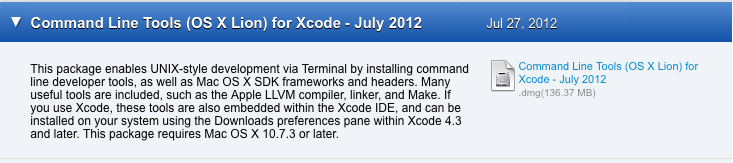
- After downloading, mount the image and install the package.
Using Clang Compiler
You can use the compiler directly from the Terminal or using another IDE like Eclipse SDK or NetBeans. Let me show you the command line way.
-
Open up the Terminal.
-
‘cd’ to the folder where you have a single C source file. (In my case it is lesson0.c)
-
Do a ‘make lesson0 to compile it.
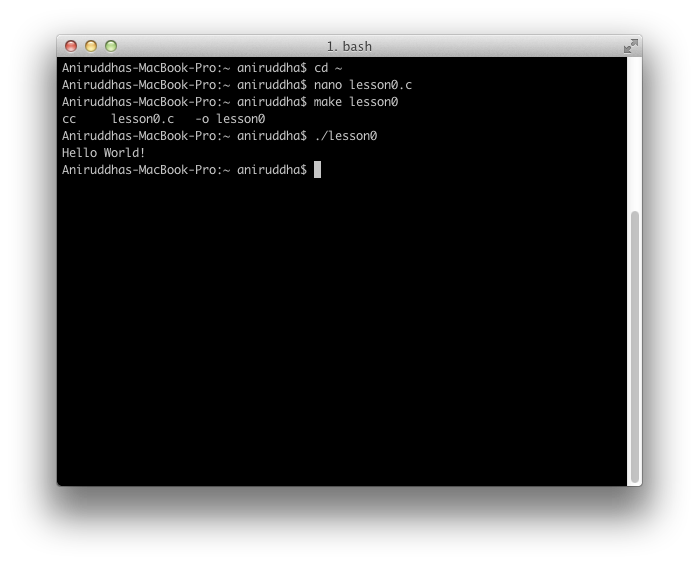
This works like the standard UNIX build system.